


Kahf Kids Parental Control App
4.818.00 Reviews
App Specs
- Version
- 3.1.1151
- Updated On
- License
- Free
- Downloads
- 100,000+
- Developer
- Kahf
- Categories
- Parenting
- Platform
- Android
Screenshots


 Analysis by AppCompare
If you’re a parent navigating the digital age, you know how tricky it can be to manage your kids' screen time. The first few days with Kahf Kids Parental Control App can feel reassuring simply because the rules are no longer vague: you have a place to set limits, block apps, and offer children videos intended for them. The bigger question, though, is whether those controls remain useful after the novelty wears off. In my view, the answer depends less on how many settings you turn on and more on whether you make the app part of a calm, consistent family routine.
Why the first week can feel easier
In the beginning, the appeal is straightforward. A parent can establish screen boundaries and choose what to block instead of negotiating every request from scratch. That can help during a school morning, a meal, or the stretch before bedtime, when a quick, predictable rule is often more useful than another argument. I’d start with one or two limits that address a real household problem rather than trying to control every minute of a child’s device use at once.
The app is in the parenting category, is free to download, and is made by Kahf. It has a 4.8 average from around 1.9 thousand ratings, with over 100 thousand installs. Those figures suggest that many families have considered it, but they don’t tell me whether its approach will fit a particular child. Its Everyone content rating describes the app’s rating, not a guarantee that every video or online experience will suit every family’s standards.
Making digital rules work at home
First things first, getting started with the Kahf Kids Parental Control App is as easy as pie. You download it, set up a parent account, and then install the app on your child’s device. It’s like getting a new gadget up and running without needing a degree in tech wizardry. The user interface is clean and intuitive, which is a big plus when you’re juggling multiple tasks.
Features That Make You Go "Wow!"
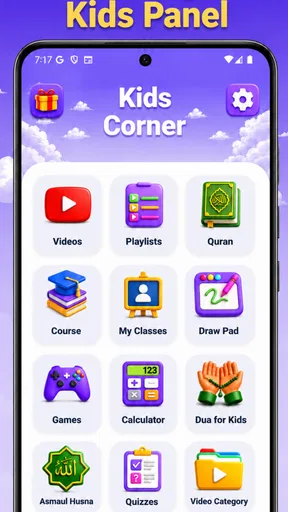
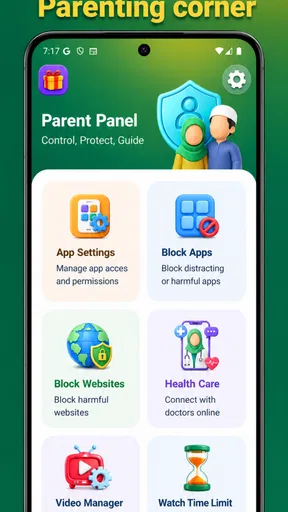
Now, let’s talk about what this app can do. It’s packed with features, and not just the basic ones you might expect. Sure, it has the standard screen time limits and app blocking, but it also lets you track location, set up geofencing, and even monitor online activity.
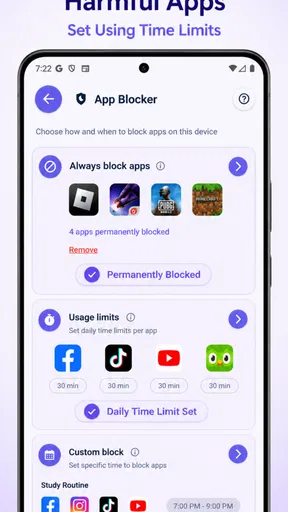
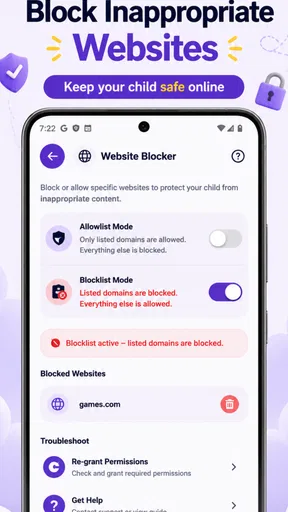
One nifty feature is the ability to set different time limits for weekdays and weekends. Because let’s face it, kids deserve a little more freedom on a Saturday, right? The app also allows you to block specific apps and websites, giving you control over what your child can access.
Keeping Tabs Without Hovering
What I really love about this app is that it helps you keep an eye on things without being a helicopter parent. The location tracking feature is discreet and doesn’t intrude on your child’s privacy. It’s like having an extra pair of eyes when they’re out and about, giving you peace of mind.
Worth Reading Before You Choose

EA SPORTS FC Mobile 26 Is a Bigger Football Game, but It Takes Time

Flipboard Shows What News Apps Must Do Beyond the Feed

Switching to Android Auto Means Rethinking Your Driving Routine

Google Calendar Makes a Crowded Week Easier to Manage

Ludo King Makes the Most of the Minutes Between Plans

Baby Panda World Brings Quick Play to Modern Phones, but Its Game Library Feels Busy
Geofencing is another standout feature. You can set up designated areas, like home or school, and get alerts when your child enters or leaves these zones. It’s a gentle way of ensuring they’re safe without constantly checking in.
Managing Online Activity: A Parent’s Lifesaver
The internet is a vast place, and keeping kids safe online is no small task. The app’s web filtering and monitoring tools are robust, allowing you to see what your child is browsing. It’s not about playing Big Brother, but rather ensuring they’re not stumbling onto anything inappropriate.
You’ll also appreciate the app’s ability to provide reports on your child’s online activity. It’s comprehensive yet easy to digest, helping you stay informed without getting overwhelmed with data.
Balancing Control and Freedom
Kahf Kids is all about balance. You want to guide your child but also give them the freedom to explore. The app’s flexibility in setting rules and limits helps you strike that perfect balance. Plus, the ability to adjust settings remotely means you’re not tied to your child’s device, giving you the freedom to manage things on the fly.
Another thoughtful feature is the reward system. You can reward your child for good behavior with extra screen time. It’s a smart way to encourage positive digital habits without turning screen time into a battleground.
A routine that can last beyond the novelty
For month-to-month value, I’d treat the controls as prompts for family conversations, not as a substitute for them. A weekday limit can make the end of screen time predictable, while a more relaxed weekend allowance can acknowledge that routines differ. If a child’s schedule changes, revisit the limits together rather than leaving old rules in place and relying on automatic enforcement to solve a new problem.
A realistic use case is a child who watches videos after school and then struggles to put the device down before dinner. A parent could use a screen-time boundary and safe video access to make that transition clearer, then check whether the arrangement is working after a few days. The practical benefit is not simply fewer minutes on a screen; it is having a shared rule to refer to when the same disagreement comes up again.
That approach also helps answer a common concern: does a parental-control app mean a parent can stop supervising altogether? I wouldn’t use it that way. Filtering and limits can reduce some risks and make expectations easier to follow, but they can’t replace age-appropriate conversations, a look at what a child is actually watching, or a parent’s judgment about context. A tool can support supervision, not perform it.
Keeping the setup useful without making it a chore
There is a maintenance cost to any system of rules. A limit that is too strict can turn every exception into a dispute; one that is too loose may not address the family’s concern. I’d begin with the smallest setup that solves the immediate issue, then change one rule at a time. That makes it easier to notice whether a change helps, instead of having several new restrictions arrive together and leaving everyone unsure what caused the friction.
It is also worth deciding in advance how you will handle legitimate exceptions, such as a video needed for school or extra time during a family trip. If every adjustment becomes a negotiation, the app can add another layer of conflict rather than reducing it. A simple household agreement about when a parent will make an exception can keep remote changes from feeling arbitrary to a child.
The app’s free starting point lowers the barrier to trying it, while in-app purchases range from $4.99 to $29.99 per item. I’d look at the current purchase choices before building a routine around anything paid, and decide whether the free experience already meets the family’s needs. Families who only want a basic device-level bedtime setting may prefer controls already built into their phone or tablet; those who want a dedicated child-focused setup may find a separate parenting app more convenient.
Where fatigue and friction can appear
Parental controls can become tiring when a parent checks reports constantly or treats every blocked attempt as evidence of bad behavior. I’d use activity information to spot patterns worth discussing, not to turn ordinary browsing into an interrogation. Children also need a clear explanation of what is being limited and why. That transparency can make a rule feel more like guidance and less like surveillance.
Another trade-off is that a broad set of controls asks parents to keep making decisions: which boundaries matter, when they should change, and how much independence a child is ready for. If your main goal is to have an open-ended video library with no need to review choices or set boundaries, this is not a replacement for your own judgment. Likewise, if you want a simple timer and nothing beyond it, a built-in device setting may be less work.
The current version is 3.1.1151, and the app’s minimum operating-system requirement is Android 7.0. That makes checking the child’s device before setup a sensible first step. The product is designed around a parent account and a child’s device, so it is best suited to households prepared to configure and maintain that arrangement rather than parents hoping for a one-tap change across every device a child might use.
Ending on a High Note
In the world of parental control apps, the Kahf Kids Parental Control App stands out for its user-friendly design, comprehensive features, and the perfect blend of control and freedom. It’s like having a digital nanny that ensures your child’s safety while respecting their independence.
So, if you’re a parent looking to navigate the digital world with a little more ease, give Kahf Kids a try. It might just be the app you didn’t know you needed.
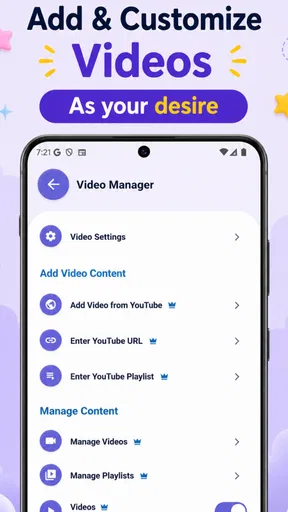
My lasting verdict is more measured: this can earn a place on a family device when its limits, app blocking, and child-oriented video experience solve a recurring problem, and when a parent is willing to revisit the rules as habits change. It is less compelling for a household that already has simple, effective device controls or that wants monitoring without ongoing conversation. I’d try it with a specific goal, keep the first rules modest, and judge its value by whether daily transitions become clearer—not by how many controls I can switch on.
Pros
- Easy setup and user-friendly interface.
- Customizable screen time limits.
- Real-time location tracking.
- App blocking and monitoring features.
- SOS alert for emergencies.
Cons
- Limited features in free version.
- May drain battery quickly.
- Needs stable internet connection.
- Some features require premium subscription.
- Occasional notification delays.
FAQs for Kahf Kids Parental Control App
What features does the Kahf Kids Parental Control App offer?
Kahf Kids Parental Control App provides a comprehensive suite of features designed to help parents monitor and manage their children's device usage. These features include screen time management, app blocking, internet filtering, location tracking, and usage reports. The app also allows for setting up specific schedules for when the child can use their device, ensuring a balanced digital life.
Is the Kahf Kids Parental Control App compatible with both Android and iOS devices?
Yes, the Kahf Kids Parental Control App is available for both Android and iOS platforms. This ensures that parents can manage their children’s devices regardless of the operating system. The app has been optimized for smooth performance and is frequently updated to ensure compatibility with the latest OS versions.
How does the app handle privacy and data security?
Kahf Kids Parental Control App prioritizes privacy and data security by implementing strong encryption protocols and secure data storage practices. The app only collects necessary information for monitoring purposes and allows parents to control data sharing settings. Regular security audits are conducted to maintain the highest standards of data protection.
Can I customize settings for different children using the Kahf Kids Parental Control App?
Absolutely! The app allows you to create individual profiles for each child, enabling you to customize settings according to each child’s age and needs. You can set different screen time limits, app restrictions, and content filters to ensure that each child has an age-appropriate digital experience.
What happens if my child tries to bypass the app’s controls?
Kahf Kids Parental Control App is designed with security measures to prevent tampering. If a child attempts to bypass the controls, parents receive an immediate alert. The app’s robust design makes circumventing its rules challenging, providing parents with peace of mind that their settings are enforced.


